
Loading...
Loading...
&
100% Placement Assistance
Online Course | Real-Time Projects | 4-6 Months |Free Demo Class
Master Microsoft Intune with Gen AI through our industry-focused training program. Learn endpoint management, device security, application deployment, compliance policies, Azure Active Directory integration, Windows Autopilot, and modern workplace administration. At Innoture Digital Edge, our hands-on labs, real-time scenarios, and expert mentorship help you build job-ready skills for cloud-based enterprise device management careers.
| Training Modes: | Online Training (Instructor-Led) |
| Course Duration: | 2-3 Months |
| Call us at: | +91 7996682999 |
| Email Us at: | trainings@innoture.co.in |
Industry-Oriented Microsoft Intune Curriculum
Our training is designed as per enterprise IT requirements. Students learn Microsoft Intune, Azure AD, Endpoint Manager, device compliance, application deployment, and security policies.
Real-Time Enterprise Administration Scenarios
Hands-on labs simulate real corporate environments including device enrollment, policy configuration, and security management across Windows, Android, and iOS devices.
Expert Trainers with Cloud & Security Experience
Our instructors have real industry experience in Microsoft 365, Azure, and enterprise endpoint management, guiding you step-by-step through real-world scenarios.
100% Placement Assistance
We provide dedicated support including resume building, mock interviews, and job referrals for roles like Intune Administrator, M365 Engineer, and Cloud Support Engineer.
Job-Ready IT Admin Skills
By the end of the course, you will be able to manage enterprise devices, configure security policies, and support modern workplace environments independently.
Flexible Online Learning Options
Live instructor-led online training designed for both beginners and working professionals with flexible schedules.
Certification Guidance
We prepare you for Microsoft certification paths like MD-102 and SC-300 to boost your career opportunities.
Beginner-Friendly Training
Even non-technical learners can start from basics and gradually move to advanced endpoint management concepts.
Career Mentorship & Guidance
We guide students toward roles in cloud administration, endpoint security, and modern IT infrastructure management.
High Demand for Intune Professionals
Organizations worldwide are rapidly adopting Microsoft Intune for device management, creating strong demand for skilled professionals.
Industry Expert Trainers with real IT Admin experience
Live Online Instructor-Led Training
100+ Hours of Practical Training
Hands-on Real-Time Enterprise Scenarios
Learn Microsoft Intune, Azure AD, Endpoint Manager, Security Policies
Device Management for Windows, Android & iOS
Application Deployment & Compliance Policies
Git & Documentation Best Practices
Resume Building and LinkedIn Optimization
Mock Interviews & Scenario-Based Questions
Placement Assistance for Eligible Students
Lifetime Access to Class Recordings
Beginner-Friendly Step-by-Step Training
3-Month Structured IT Administration Program
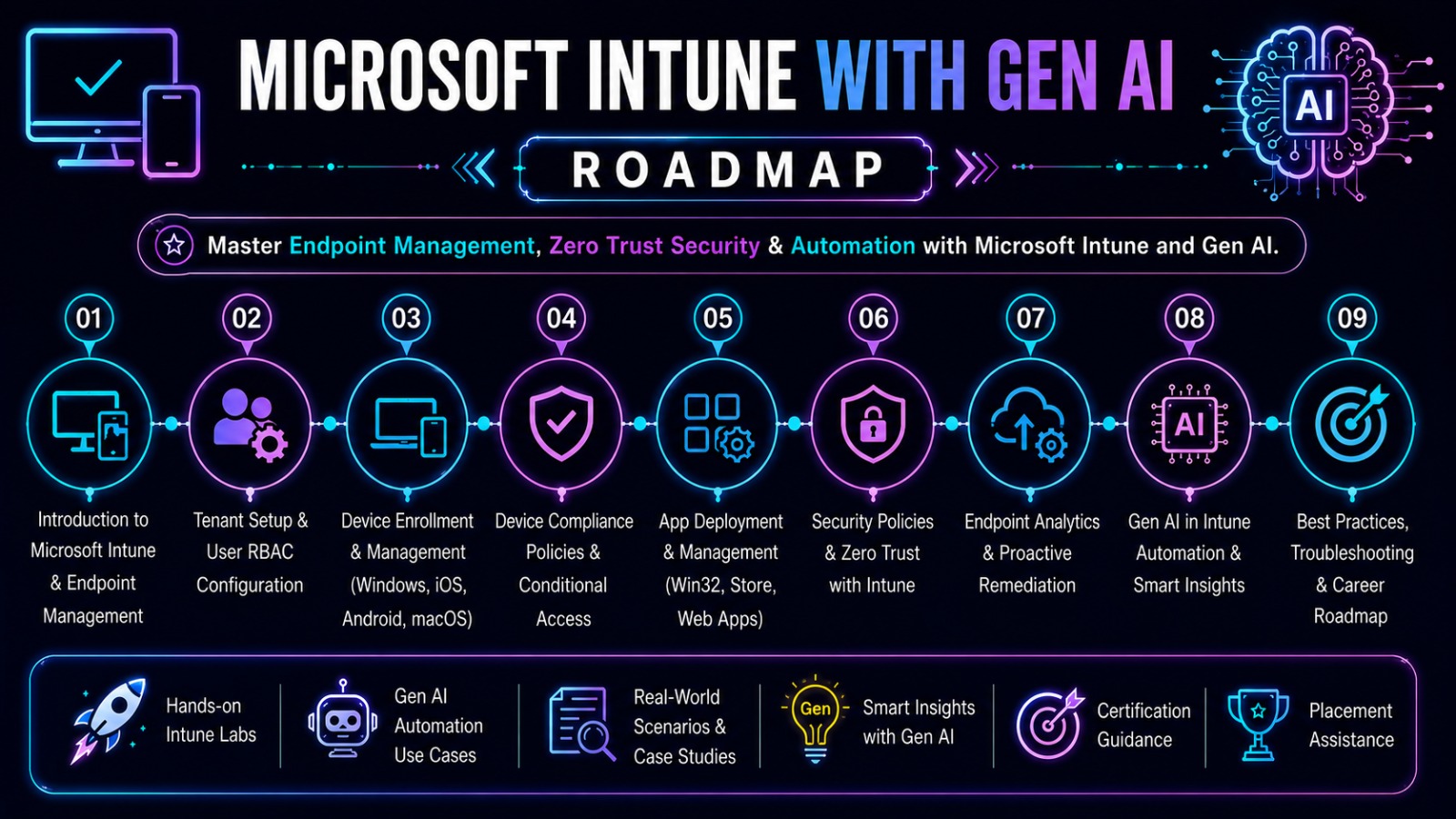
Understand fundamentals of cloud computing, Microsoft 365, and IT administration concepts used in enterprise environments.
Learn Intune architecture, endpoint management, device enrollment, and tenant setup for enterprise environments.
Manage and configure enterprise devices including enrollment, compliance policies, and configuration profiles.
Deploy and manage applications using Microsoft Intune including Win32 apps, store apps, and app protection policies.
Implement security baselines, compliance policies, conditional access, and endpoint security configurations.
Learn identity management using Azure AD for authentication, SSO, RBAC, and access control.
Track device health, compliance reports, audit logs, and Intune analytics for enterprise environments.
Learn co-management, automation, PowerShell scripting, and advanced endpoint security configurations.
Work on enterprise device management, security policy implementation, and hybrid workplace setup projects.
Understand cloud deployment, device troubleshooting, and real-world IT support scenarios.
Microsoft Intune is a cloud-based endpoint management solution that helps organizations manage devices, applications, and security policies across Windows, Android, and iOS platforms. It enables secure access to company resources from anywhere.
Manage corporate and personal devices using enrollment, compliance policies, and configuration profiles to ensure security and standardization.
Deploy, update, and protect applications across enterprise devices using Intune app management features.
Enforce security policies, conditional access, and compliance rules to protect corporate data.
Intune integrates with Azure Active Directory and Microsoft 365 to provide unified identity and access management.
| Feature | Traditional IT | Microsoft Intune |
|---|---|---|
| Device Management | Manual setup | Cloud-based centralized management |
| Security | On-premise policies | Conditional access & compliance policies |
| Deployment | Physical installation | Remote app deployment |
| Scalability | Limited | Highly scalable cloud solution |
| Monitoring | Manual tracking | Real-time analytics & dashboards |
Students interested in IT infrastructure, cloud computing, and system administration can build strong foundational skills in enterprise device and endpoint management.
B.Sc, BCA, B.Com, or other graduates aiming for IT careers can start learning Microsoft Intune and cloud administration from scratch.
Graduates seeking IT support, cloud administration, or Microsoft 365 roles can gain job-ready skills through hands-on training.
Candidates preparing for IT administrator, M365, and cloud support roles can improve employability with real-time Intune skills.
IT support and networking professionals can upgrade their skills toward cloud-based endpoint management and Microsoft 365 administration.
Non-IT professionals can transition into cloud and IT administration careers with structured beginner-friendly training.
Anyone interested in enterprise IT systems, cloud platforms, and device security can start their journey in modern IT administration.
Resume Building

Placement Training

Interview Questions

Internships Under Experts

Realtime Live Projects
Get Offer Letter
Scheduling Interviews

Mock Interviews

Personality Development

Aptitude Preparation
Get a premium, ATS-friendly resume designed by industry experts that highlights your technical skills, certifications, and real-time project experience.
Comprehensive job-oriented training focused on current industry requirements, technical skill enhancement, and company-specific preparation strategies.
Extensive collection of frequently asked technical and HR interview questions with detailed answers, real-time scenarios, and problem-solving guidance.
Work on industry-based live projects to gain practical exposure and hands-on experience that strengthens your professional portfolio.
Improve communication skills, confidence, presentation skills, body language, and professional etiquette to succeed in interviews and corporate environments.
Attend multiple mock interviews conducted by experienced industry professionals with detailed feedback and performance improvement guidance.
Dedicated team assistance for scheduling interviews with hiring companies and coordinating follow-ups.
Complete support until you receive your offer letter, including salary negotiation guidance and onboarding preparation.
Manage enterprise devices, configure policies, enforce security, and ensure secure access using Microsoft Intune and Endpoint Manager.
Handle Microsoft 365 services including identity, security, compliance, and collaboration tools across organizations.
Provide technical support for cloud infrastructure, endpoint management, and enterprise IT environments.
Implement security baselines, compliance policies, and protect enterprise endpoints from threats.
Support users, troubleshoot devices, manage applications, and handle enterprise IT operations.
Work on Azure services including identity, storage, networking, and cloud infrastructure management.
Design and manage modern workplace solutions using Microsoft Intune, Microsoft 365, and Azure AD.






Microsoft Intune professionals are in high demand as organizations rapidly move toward cloud-based device management and modern workplace solutions. Skills in endpoint management, Microsoft 365, and Azure make Intune experts valuable in IT operations and enterprise security teams.
Freshers
₹3.5 LPA to ₹6.5 LPA (based on skills, certifications, and hands-on practice)
2–5 Years Experience
₹6 LPA to ₹12 LPA
Senior Roles
₹12 LPA to ₹20+ LPA in enterprise and cloud-focused organizations
The demand for Microsoft Intune professionals is growing rapidly as companies adopt cloud-first strategies and modern workplace management using Microsoft 365 and Azure.
Organizations need skilled Intune administrators to manage enterprise devices, enforce security policies, and ensure compliance across distributed work environments.
Companies use Intune to manage employee devices, security policies, and enterprise applications.
Used for securing endpoints, managing compliance, and protecting sensitive financial data.
Helps manage hospital systems, patient data security, and device compliance.
Schools and universities use Intune for device management and remote learning setups.
Large organizations use Intune for unified endpoint management across global teams.
Used for secure device management and policy enforcement across departments.






Microsoft Intune and cloud administration skills are in high demand across IT companies. Upgrade your career with modern workplace and endpoint management expertise.
Hear what our students have to say about their journey with Innoture Digital Edge.
"The Java Full Stack course was a game-changer for my career. The real-time project experience was invaluable, and the trainers, who are actual industry architects, provided insights I couldn't get anywhere else. I landed my dream job within a month of completion."
"I was struggling to pass the AWS Solutions Architect exam on my own. Innoture Digital Edge's focused training and hands-on labs made all the difference. The instructors explained complex concepts with such clarity. Highly recommended for any cloud aspirant!"
"The UI Full Stack program is top-notch. I went from knowing basic HTML to building complex React applications with confidence. The placement assistance team was incredibly supportive, helping me build my resume and prepare for interviews."
"I joined Innoture Digital Edge to learn Java Full Stack Development and it was one of the best decisions for my career. The trainers explain concepts clearly and the real-time projects helped me understand how companies actually build applications."
"The course structure is excellent for beginners. I started with basic programming and now I can build full web applications using Java, Spring Boot, and React. The placement support is also very helpful."
"What I liked most is the practical training. Instead of only theory, we worked on real projects and GitHub portfolios. This helped me feel confident during interviews."
"The trainers are very supportive and guide students step by step. Even when I had doubts after class, they helped me understand the concepts clearly."
"Great institute for learning full stack development. The mock interviews and resume building sessions helped me prepare for real company interviews."
"I highly recommend this training program for anyone who wants to start a career in software development. The curriculum covers everything from basics to advanced topics."
"The best part of the course is the real-time projects and practical sessions. It helped me gain confidence in coding and application development."
"The learning environment is very good and the trainers explain concepts with real industry examples. It makes learning much easier."
"Good training with updated technologies like Spring Boot, REST APIs, and React. The course content is very relevant to current industry needs."
"This course helped me understand both frontend and backend development. The guidance provided for interviews and career growth is very valuable."
"The course helped me understand SEO, Google Ads, and social media marketing clearly. The practical sessions gave me confidence to work on real campaigns."
"The trainers explained every concept in a simple way. I learned keyword research, website optimization, and how SEO works in real projects."
"A very useful course for learning digital marketing from basics to advanced strategies. The projects helped me understand real marketing campaigns."
"The training is well structured and beginner friendly. I learned how to create content and promote brands online."
"I gained hands-on experience with Google Ads and campaign optimization. The trainer support was excellent."
"The practical examples and assignments helped me understand marketing strategies and analytics tools."
"A great place to learn digital marketing with real-time examples and guidance."
"The course helped me improve my marketing knowledge and understand how businesses grow online."
"I learned social media strategies, audience targeting, and campaign management through practical sessions."
"The assignments and projects helped me gain real knowledge and start working on freelance marketing projects."
Get answers to common questions about Microsoft Intune Training with Gen AI.